
Build and validate
Compare parameter combinations without changing your saved strategy.
The Strategy Optimizer runs controlled historical tests against an owned strategy, compares every candidate with the original baseline, and lets you apply only a completed result you have reviewed.
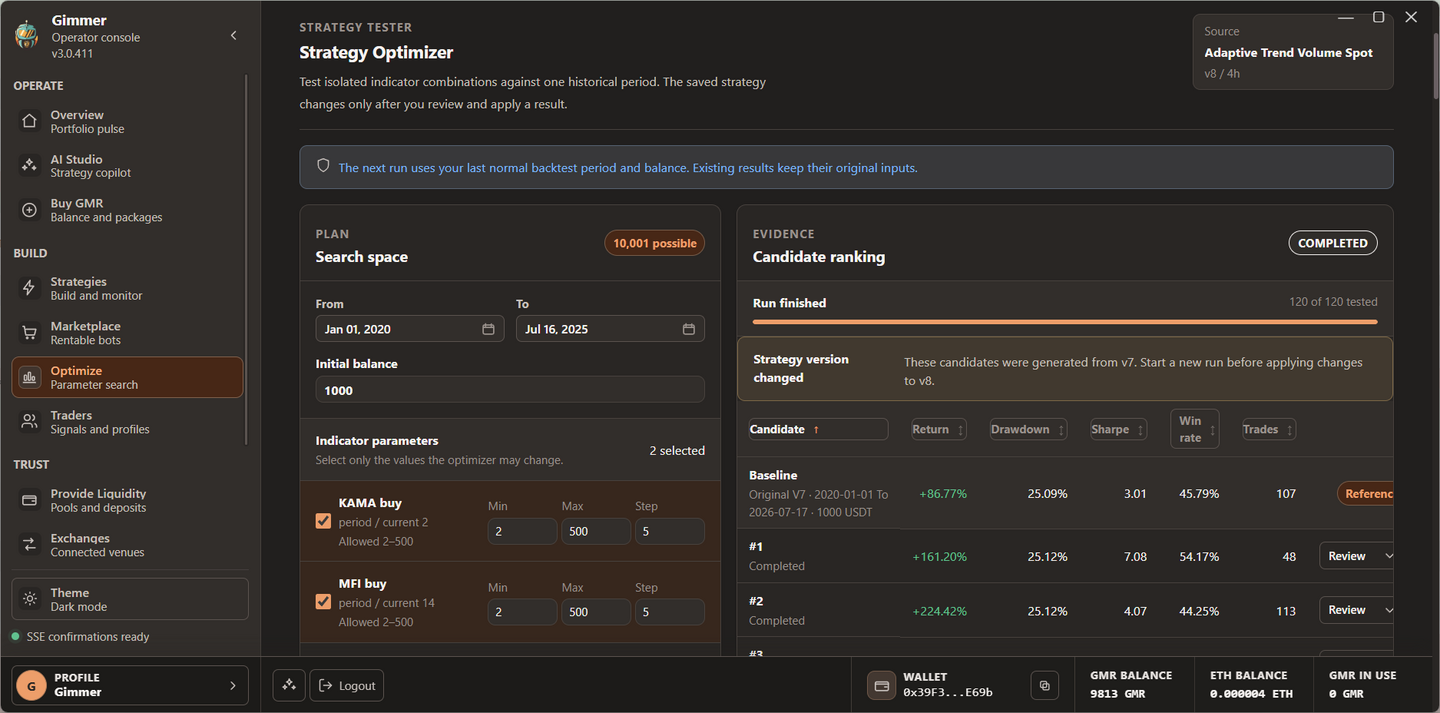
What the optimizer changes
The optimizer creates temporary strategy snapshots for historical testing. Your saved configuration remains untouched while the run is queued, while the baseline is built, and while candidate backtests execute.
- Source
- The exact saved strategy version, exchange, markets, timeframe, and execution mode selected when the run starts.
- Baseline
- A full backtest of the original settings over the same dates and initial balance used by every candidate.
- Candidate
- An isolated copy whose selected parameter values differ from the source within the ranges you define.
- Application
- An explicit action that writes the reviewed combination and creates a new strategy version. It does not start a simulation or live bot.
Which strategies can be optimized
Start with an owned and saved Indicators or Swing strategy. The strategy may use Spot or Margin execution where that engine supports it.
| Strategy | Current support | Values available to search |
|---|---|---|
| Indicators with Spot | Supported | Numeric parameters exposed by each configured indicator. |
| Indicators with Margin | Supported | The same bounded indicator parameters while Margin execution rules remain attached to the source. |
| Swing with Spot or Margin | Supported | Martingale policy and multiplier, drawdown entry, and profit exit. |
| AI Decision, Code Editor, or Portfolio | Not currently supported | These engines do not expose the bounded optimizer parameter contract. |
| Marketplace rental | Read-only | A rented strategy cannot be modified or versioned by the optimizer. |
Open Optimize under Build and select an eligible strategy, or use the Optimize action on that strategy. Save new or edited strategies before opening the workspace.
Build a controlled search space
- Choose the period. Use dates that contain different market conditions and confirm that the selected timeframe has complete candle data.
- Set the initial balance. Use a realistic quote balance so sizing, fees, concurrent positions, and open equity remain meaningful.
- Select parameters. Enable only the values the optimizer may change. For each numeric value, set a minimum, maximum, and step inside the allowed bounds.
- Limit the candidate budget. The current workspace accepts 2 to 1,000 tests and defaults to 12. A lower budget finishes sooner; a broader search uses more CPU and historical data.
- Set the minimum trades. The current default is five. Candidates below the threshold remain visible for diagnosis but are not ranked and cannot be applied.
- Run the optimizer. The baseline runs first. Candidate results enter the ranking as their backtests finish.
Combinations grow quickly
A broad range with a small step can produce thousands of possible combinations. Select a focused hypothesis and use the candidate budget to keep the run bounded.
How risk-adjusted ranking works
Every eligible candidate receives a relative score against the other completed candidates in that run. The baseline is a reference and is never ranked as a recommendation.
| Metric | Weight | What the score favors |
|---|---|---|
| Return | 35% | Higher net change over the selected historical period. |
| Sharpe ratio | 25% | More return relative to measured variability. |
| Maximum drawdown | 20% | A smaller peak-to-trough equity decline, including open-equity effects reported by the backtest. |
| Profit factor | 10% | A stronger relationship between gross winning and losing results, capped in scoring to reduce distortion. |
| Win rate | 10% | A higher share of winning closed trades without letting this metric dominate the ranking. |
The table in Gimmer also exposes return, drawdown, Sharpe ratio, win rate, and trade count directly. Open Review to compare each changed parameter with the current strategy and use Backtest combination to inspect the full report.
Progress continues in the background
After the run is accepted, it continues on the backend even if you switch strategies or leave the optimizer page. Returning to the strategy restores the latest durable run, its tested-candidate count, results, and terminal status.
- The baseline may take several minutes because it covers the complete selected period.
- Completed candidates appear as they finish; you do not need to keep the results table visible.
- Cancel run prevents new candidates from starting and marks untested work as cancelled. Completed evidence remains recorded.
- Runtime safeguards stop a candidate that becomes inactive or exceeds its bounded execution window, then expose the failure instead of leaving the run silently stuck.
Review and apply a candidate
- Wait for completion. Only a completed, ranked, non-baseline candidate can be applied.
- Compare with the baseline. Look beyond the top score. Review drawdown, trade count, final balance, and the exact parameter changes.
- Open its full backtest. Inspect the chart, report, trades, open PnL, fees, and behavior across individual markets.
- Apply deliberately. Confirming the action creates a new strategy version and preserves the optimizer run in history.
- Validate again. Run an out-of-sample backtest on dates that were not used for optimization, then use simulation before considering live funds.
If the source strategy changed after the run started, Gimmer marks the evidence as stale and prevents application. Start a new run from the current version instead of applying parameters measured against an older snapshot.
Avoid overfitting historical noise
The highest score is not a forecast
Optimization can describe one historical sample very well and still fail in a different market regime. No candidate, score, backtest, or simulation guarantees future performance.
- Keep a later date range completely outside the optimization period for out-of-sample validation.
- Prefer a stable region where neighboring parameter values behave reasonably, not one isolated peak.
- Reject candidates that depend on very few trades, one asset, or one short market event.
- Compare open-equity drawdown and capital usage, not only realized return.
- Re-run the original baseline whenever strategy logic, markets, timeframe, costs, or execution mode changes.
Troubleshoot a run
- No optimizable strategy
- Save an owned Indicators or Swing strategy first. Rentals and engines without bounded parameters are excluded.
- No distinct candidate
- Select at least one tunable parameter and make sure its range produces a value different from the baseline.
- No candidate is eligible
- The completed results did not reach the minimum trade sample. Review the period and strategy behavior before considering a lower threshold.
- Baseline or candidate failed
- Open the recorded error, verify the date range, exchange data, timeframe, and strategy settings, then retry with a smaller controlled plan.
- Apply is unavailable
- Finish the run, choose a ranked result, and confirm that the source strategy is still on the version used by the optimizer.