
Build and operate
Read current signal evidence in Runtime activity.
Older Gimmer releases summarized indicator agreement in a Sentiment Bar. Current operation emphasizes explicit closed-candle evaluations and decisions in the live runtime feed.
What replaced the Sentiment Bar
Runtime activity records the market, candle interval, decision engine, action, closed-candle time, and relevant value. This makes the evidence attributable to a specific evaluation instead of presenting only an aggregate visual sentiment.
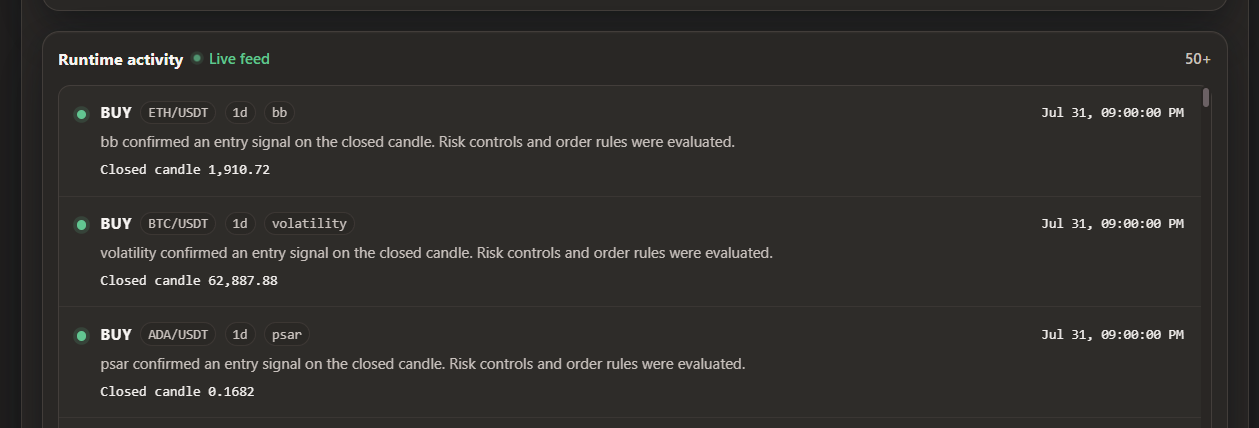
Interpret an activity event
- Action
- Buy, sell, long, short, close, hold, or an engine-specific decision.
- Symbol
- The market evaluated, such as ETH/USDT.
- Interval
- The closed-candle duration used by the strategy.
- Engine
- The indicator, swing rule, AI runtime, custom code, or portfolio process that produced the result.
- Time
- The closed candle associated with the decision. This is more important than the time you opened the page.
Multiple indicators
When a strategy combines indicators, the configured logical relationship determines whether they must all agree or whether another rule is used. The runtime event describes the final strategy decision; use the saved strategy configuration and backtest evidence to understand each contributing condition.
Detect a stalled strategy
No trade can be normal. No evaluation after an expected closed candle can indicate a problem. Compare the latest event with the interval, then check runtime health, exchange connectivity, system sleep, clock accuracy, and recorded errors.